
Your work pays for a Copilot licence. You're probably using a fraction of it. Follow one realistic working day from a full inbox to a finished board deck, then see a simple Copilot agent built live. You will need the paid Microsoft 365 Copilot licence. The free Copilot Chat isn't enough.
Can't make this date? Register your interest and we'll email you when the next one is set.
No upcoming dates right now. Please check back soon.
Most people with a work Copilot licence use it for one or two things.
Usually that's finding an email, or a quick summary of a long thread. The rest of the licence sits there untouched, and this workshop is about the rest.
One working day, start to finish
You're back from two weeks' leave. There are 150 emails waiting, you missed yesterday's budget meeting, and a board report and slide deck are due tomorrow. Over the morning, Copilot carries that one piece of work all the way through:
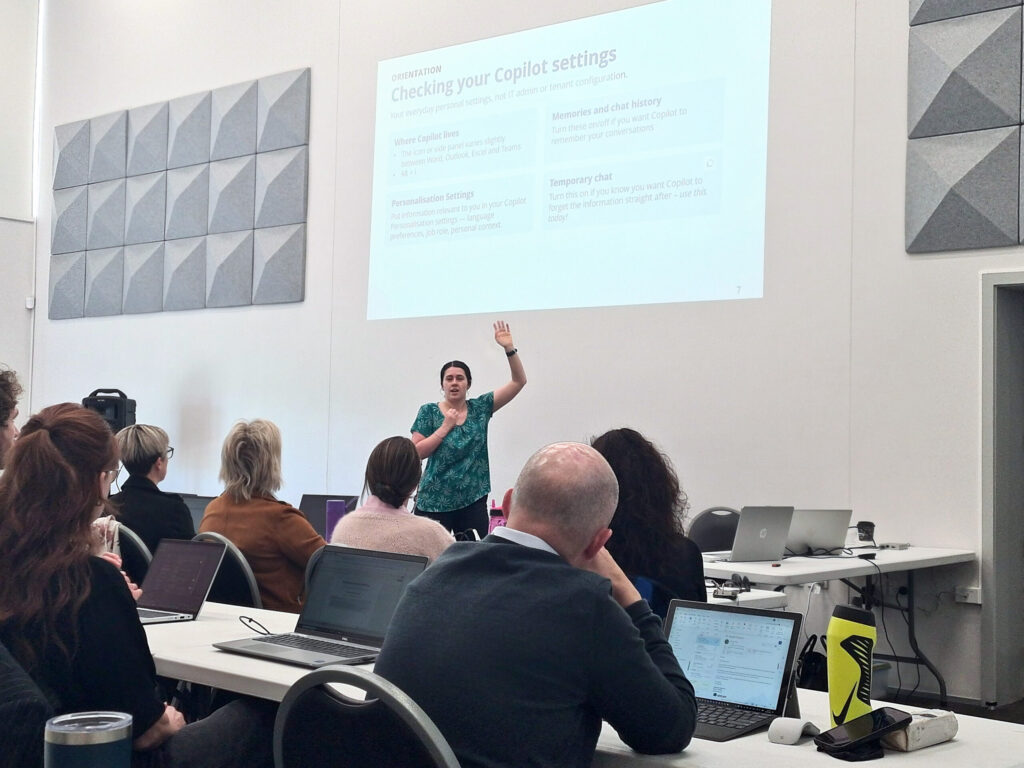
Chelcie works through each step live on screen. You get the practice files beforehand, so you can try it in your own Copilot as she goes.
It starts with a short orientation on the settings worth checking, and when to ask Copilot across all your work instead of inside one app. Prompting comes up lightly, as one pattern (Context, Task, Constraints) that works in every app. If you've got a licence and you're here, you're past the basics.
Your organisation's voice, and your first agent
After the break, Copilot drafts a tone of voice guide for your organisation, and you use it to write and check copy so it sounds like you.
Then you look at Copilot agents and what they could do where you work. Chelcie builds a simple one live: a helper that draws on a staff handbook, so people can ask “how do I apply for leave” or “what's our policy on working from home” and get an answer, instead of hunting through SharePoint or asking the person next to them. You'll see where agents earn their keep (questions with one clear answer that people ask over and over) and what to weigh up first, like who keeps the source documents up to date.
Shown live on screen, with your own Copilot open to try each step.
What Copilot can and can't do, the settings worth checking, and when to ask it across all your work instead of inside one app.
Copilot drafts today's priority list from your email, calendar and Teams, then Outlook summarises threads, drafts replies and gets you ready for your next meeting.
A Teams recap of who said what and the actions, then the questions nobody answered.
In Excel, find what's inconsistent or missing, add the figures confirmed in the meeting and get a one-line summary.
Word fills in the financial summary from the budget and meeting notes, then tightens the language for the board.
PowerPoint builds a short board deck from the report, one slide per section.
Copilot drafts a tone of voice guide, then writes and checks copy against it.
What agents are good for, then an HR helper built live from a staff handbook.
A small, low-risk task a day to practise on, and where to take your questions afterwards.
People with a paid Copilot licence through work who know there's more in it than they're reaching.
It doesn't matter what you do. The examples are everyday office work, so they carry across whatever your role is.
You have the paid Microsoft 365 Copilot licence. You've tried it in Outlook or Teams and want it doing more of your actual work.
Most of your work happens in Outlook, Teams, Excel, Word and PowerPoint, whatever your job title.
You're welcome to come and watch what the paid licence can do, but you won't be able to follow along on your own laptop.
You're a complete beginner, or you already use Copilot heavily across every app. Beginners, start with Build business systems with AI.
Start with the basics, then bring Copilot into your whole working day.
ChatGPT, Copilot and Claude compared on your own work, and your first process written down.
If you're new to CopilotThis workshop. One working day across Outlook, Teams, Excel, Word and PowerPoint, and a simple agent built live.
You are here“Getting to know parts of Copilot that I didn't know about.”
“Running through real examples and prompts on my computer with someone to ask.”
“Presenter was able to answer random questions clearly and concisely.”
Digital Workplace Consultant, First Focus
Chelcie Phillips is a Digital Workplace Consultant at First Focus, where she designs digital workplace environments and delivers Microsoft 365 training for clients and internal teams. Her training centres on better workplace communication and collaboration.
She spends her days helping teams use technology properly, not just switch it on. For Chelcie that means making the everyday Microsoft 365 tools people already have useful in their actual work, Copilot included.
She has run this workshop at Nelson AI Sandbox before, and she’ll tell you to ask questions any time. In her words, she won’t bite. Outside work she’s usually learning something new or off on an adventure.
A light, airy room with free off-street parking. Tea, coffee and morning tea are provided.
Three things, and you're ready.
Signed in to the work account that has your paid Microsoft 365 Copilot licence, so you can try each step yourself.
Sign in at m365.cloud.microsoft and scroll to the bottom of the home page. The label under your name should say M365 Copilot (Premium).
We'll email a few files before the workshop. Save them to your Downloads or Desktop, not SharePoint, so they're easy to reach on the day.
Required: a paid Microsoft 365 Copilot licence (Business or Enterprise).
The included Copilot Chat version is not sufficient to participate fully in the practical exercises. If you don't have the paid licence yet, you're welcome to come and watch.
Sign in to Microsoft Copilot with your work account and check the licence label under your name.
More on the labels: Microsoft Support
It's pitched at people who've used Copilot for a few things and can tell there's more. If you already use it heavily across every app, this will cover ground you know. If you've never used it, start with Build business systems with AI.
Some of it. A few prompts, like catching up after time away, work best on your own inbox, and Copilot only works with what your account can already access. The main exercises use the practice files we send beforehand.
We also show you temporary chat, which makes Copilot forget the conversation straight after. Follow your organisation's rules on what you use Copilot for.
That depends on your licence and your organisation's IT settings. You'll see one built live and what to weigh up before making one, which is useful to take back to whoever looks after Microsoft 365 where you work.
Yes. Choose the invoice option when you get to payment on Humanitix.
Refund up to one day before the workshop. With two to three days' notice we can also move you to the same workshop on a later date.
Yes. Step-free access, accessible toilets and accessible parking.
Yes. Email storefront@aisandbox.org.nz and we'll get in touch.
$199 incl GST, plus booking fee. Bring your work laptop and see what the rest of your paid Copilot licence can do.
Nelson AI Sandbox provides AI education and information only. We do not provide professional advice. AI tools may produce inaccurate, biased or inappropriate outputs and may raise privacy, confidentiality, intellectual property, security and compliance risks. Users are responsible for assessing suitability and legality before using any AI tool, workflow or output. Liability is excluded to the maximum extent permitted by New Zealand law.